
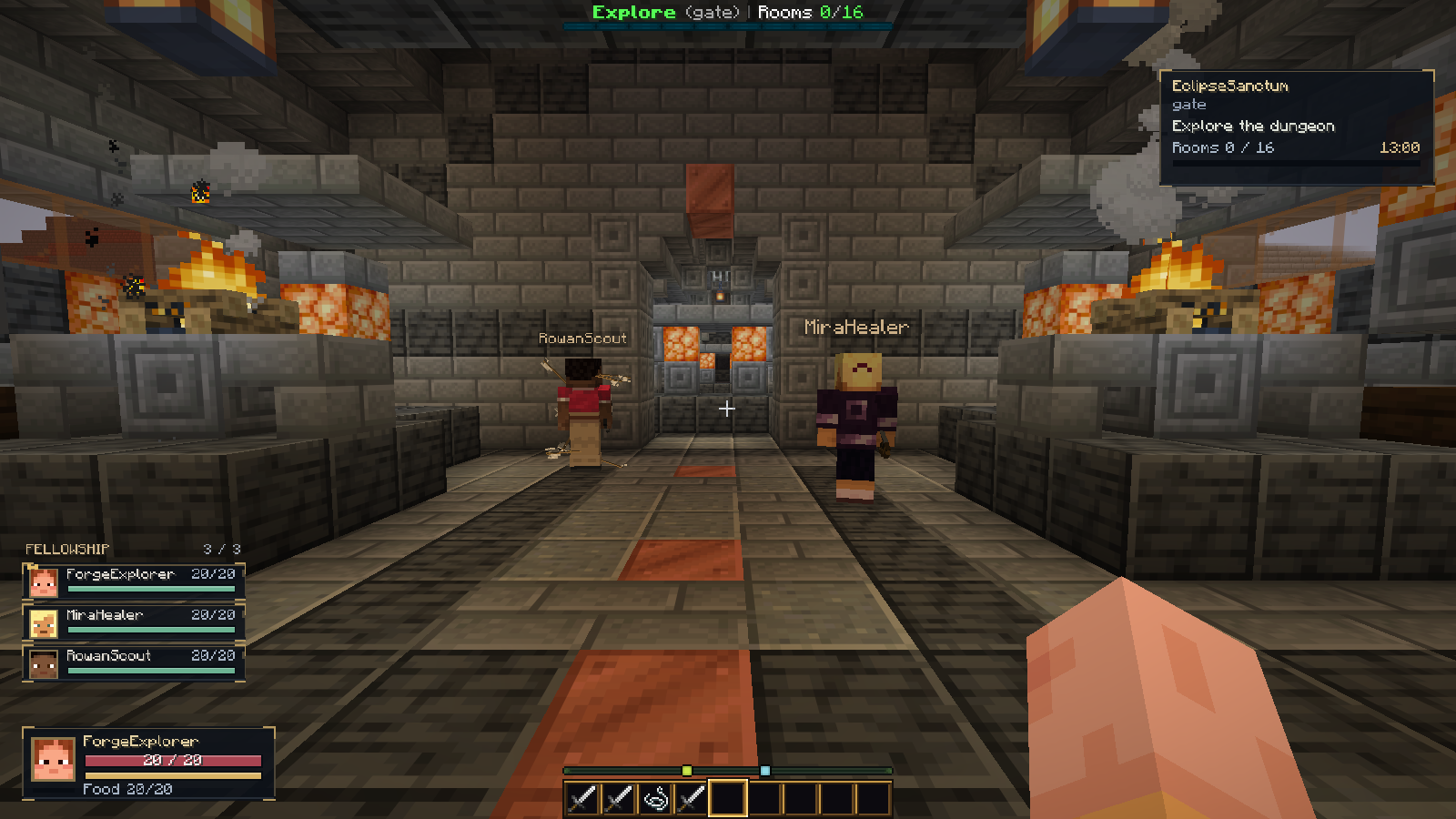
Legacy free Core 1.4.1 archive: this earlier core download has no bundled starter classes. The current US$5.99 Starter 1.4.2 offer includes basic Warrior/Mage/Ranger examples; see the current overview. The existing free archive remains unchanged. ForgeHUD Free 1.4.1 adds a compact MMO-style player panel, smaller party frames and a resizable dungeon tracker alongside the ornate DungeonForge boss display. It works without buying a class plugin.
Download ForgeHUD Free 1.4.1 · ForgeCraft Discord and free resources · Get DungeonForge
This is a tested integration preview for Paper 1.21.11. The optional companion is for Minecraft Java 1.21.11 with Fabric Loader and Fabric API. The package contains the free server plugin, production client companion, HUD resource pack and installation instructions. DungeonForge and paid classes/equipment are separate.
Smaller panels, your own layout
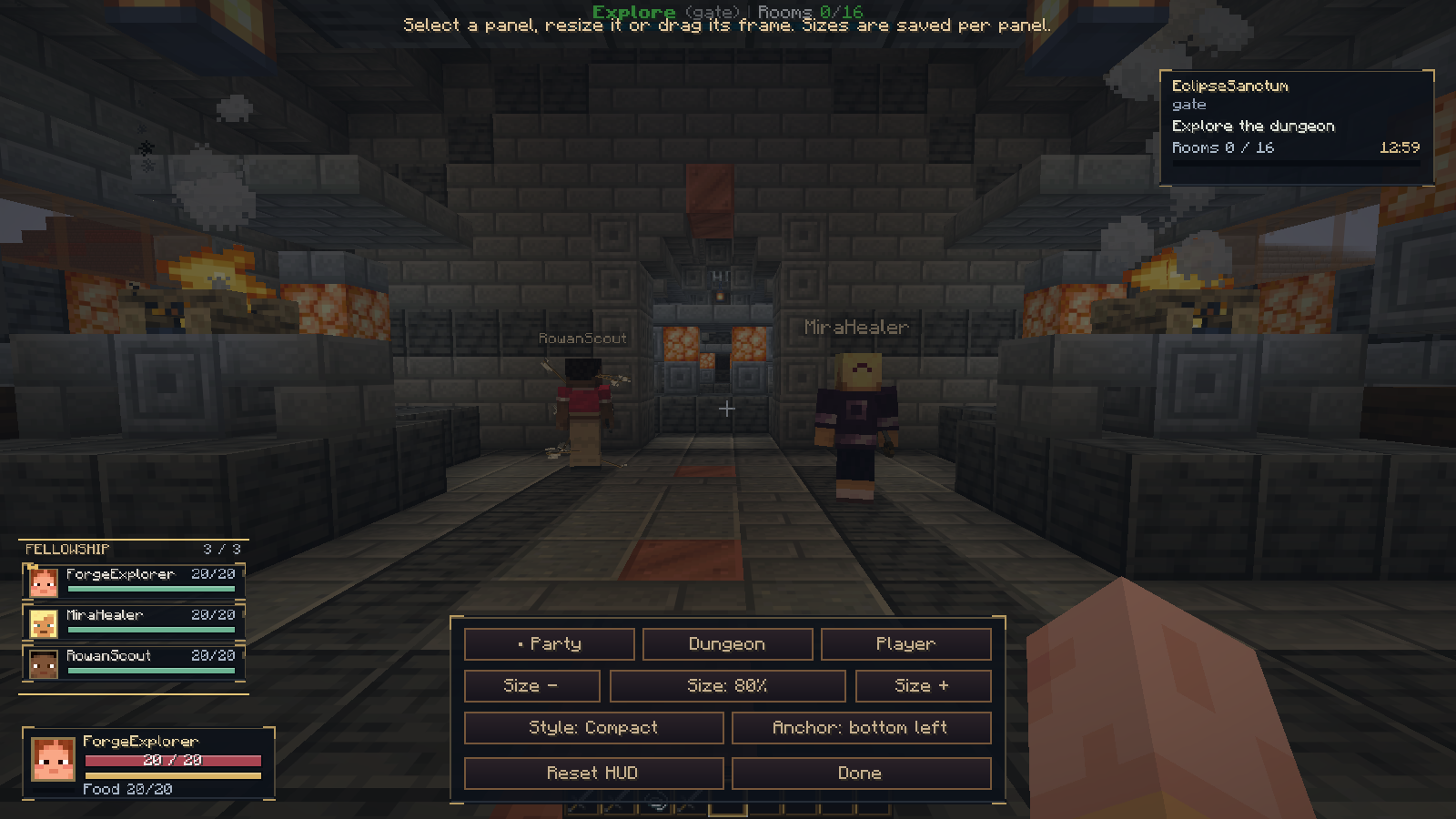
Press F8 → HUD size / layout. Select Party, Dungeon or Player, then use Size − / Size + to change only that panel from 50% to 150% in 5% steps. Drag its frame to reposition it and choose a corner anchor. Each panel keeps its own size and saved position.
Defaults place small party frames at the lower left, a compact portrait/health/resource player panel below them, and a small dungeon goal card at the upper right. These defaults use roughly 60% less panel area for the party group and dungeon tracker than the earlier detailed 1.4.0 layout at the same Minecraft GUI scale. Players without a class see actual Food; no class or invented Mana is required.
Party and Dungeon offer Compact / Detailed styles. Detailed dungeon mode includes enemies, secrets and deaths. Player offers MMO panel / Classic orbs. Classic resource-pack orbs, the vanilla hotbar and resource-pack boss/skill artwork keep their existing Minecraft GUI scaling; the new independent Player size controls apply to the MMO panel.
Reset HUD restores the compact arrangement while keeping key bindings. Older saved layouts migrate once to the smaller defaults. Settings are stored in the client file config/forgehud-controls.json and persist after restarting Minecraft. Update both the server plugin and client companion to 1.4.1 to use the compact player panel; clients without its handshake keep the classic fallback.
What players see
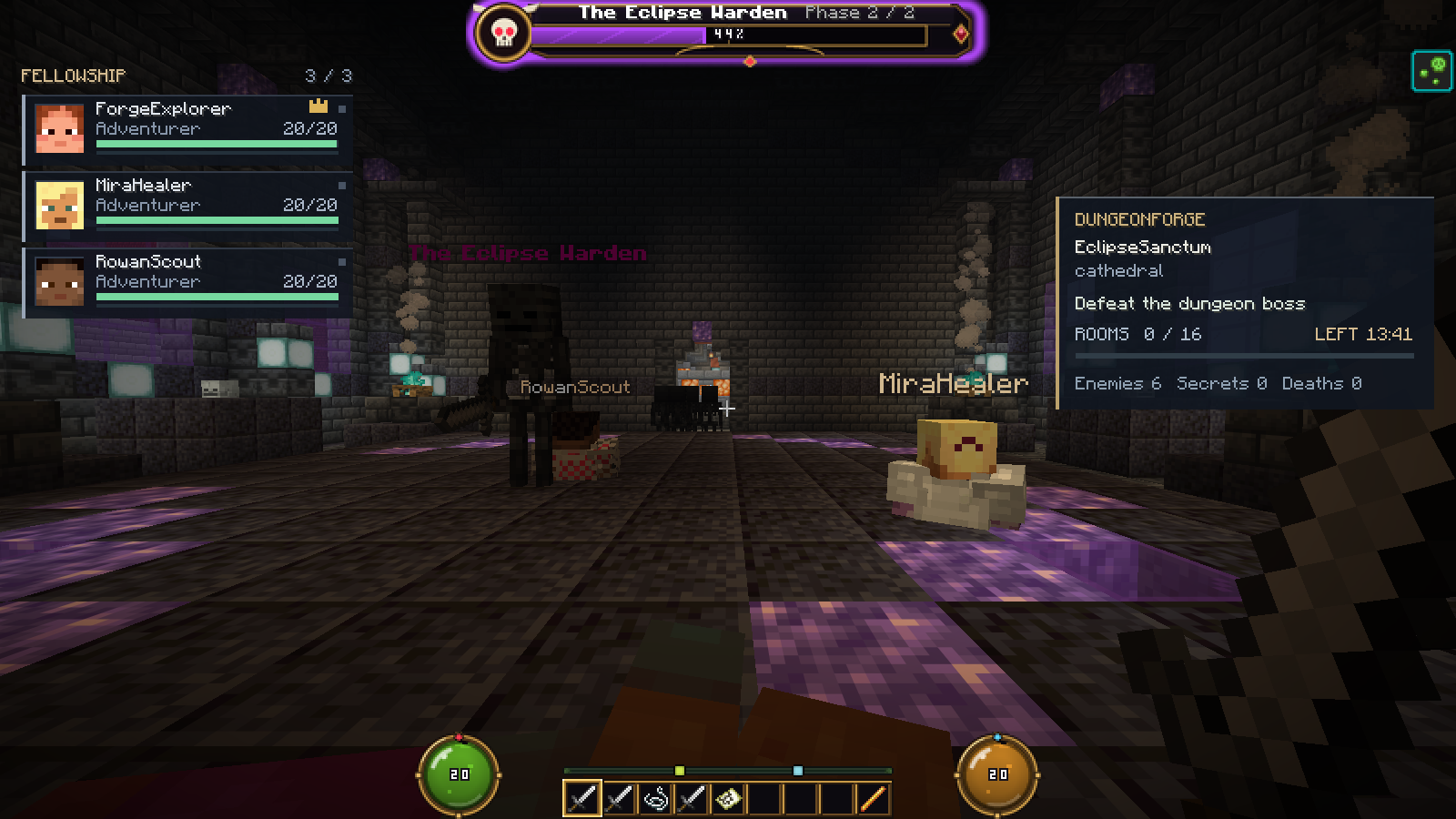
The card reads the viewer's actual DungeonForge run (choose Detailed for all counters): dungeon name, current room, rooms cleared, configured countdown (or elapsed time for an unlimited run), current-room enemies, found secrets and deaths. The guidance changes with preparation, exploration, enemies, boss fights and exit readiness.
Guidance is inferred from run state. This release does not add creator-authored quest chains or branching story objectives. It displays progress; DungeonForge continues to own entry checks, party permissions, rewards and completion.
The boss frame displays the actual native DungeonForge boss phase and health. The party frames use the same DungeonForge party as the commands and dungeon entry.
Server installation
- Back up
plugins/ForgeHUD/and player data. Stop the server fully. - Place
server/ForgeHUD-1.4.1.jarinplugins/. Keep only one ForgeHUD JAR. Install DungeonForge separately, then restart. - Keep
integrations.dungeonforge.enabled,integrations.dungeonforge.run-hudandcontrols.client-enabledenabled. Existing configuration files are retained when upgrading; add the settings if previously disabled. - Configure pack delivery below. Restart after replacing JARs or changing hosting settings. Avoid Bukkit
/reload.
Java 21 bytecode is used. Live qualification used JDK 25, Paper 1.21.11 and DungeonForge 1.7.1 plus the local 1.7.2 candidate. This does not qualify Folia or other client/server versions.
Resource pack delivery
The free pack is embedded in the server plugin. For built-in hosting, set pack.public-address to an address players can reach and allow TCP port 8163. Loopback only works on the host PC. Alternatively, host the supplied ZIP at a direct public HTTPS URL and set pack.url.
Keep pack.assume-loaded: false for normal delivery. Only enable it for a verified combined pack that contains these HUD assets. Players must accept the resource pack for ornate orbs and boss artwork. Conflicting HUD packs may need a manual merge. The live card and companion party frames are drawn by the client mod.
The free ZIP has empty equipment/arsenal defaults and excludes paid equipment collections and paid class model packs. Back up custom equipment settings and merged packs before updating. This release does not remove existing custom catalogue data automatically.
Client installation and controls
Install Fabric Loader and Fabric API for Minecraft 1.21.11. Put client/ForgeHUD-Controls-1.4.1+1.21.11.jar into the player's mods/ directory, then restart Minecraft. The client JAR does not belong in the server's plugins folder.
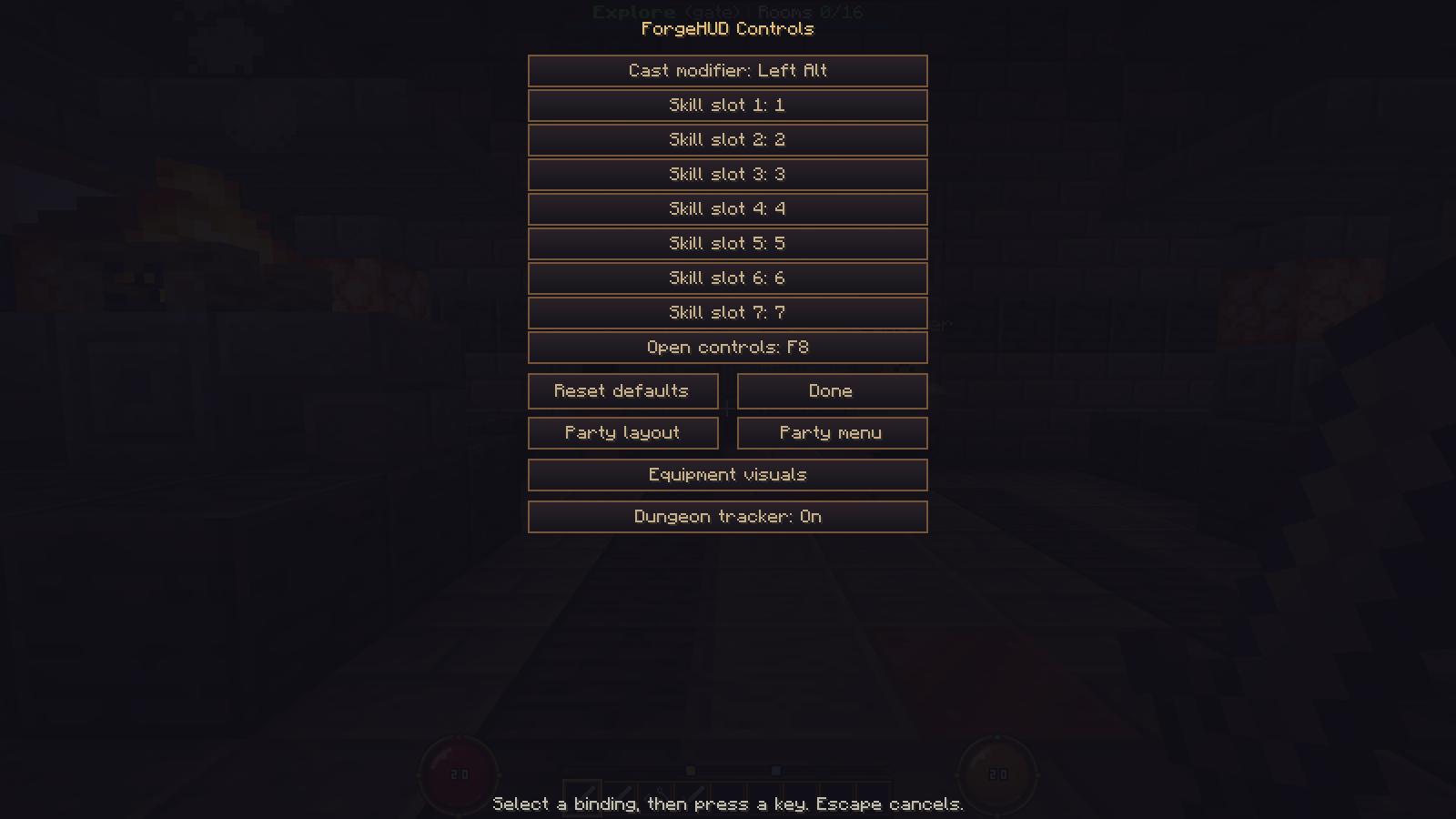
Press F8 for Dungeon tracker: On/Off, the party menu and party layout. /hud switches the player's overall HUD. The release companion excludes the developer capture hooks used to take the demonstration photos.
Create a party and enter
Use /fparty create, then /fparty invite NAME. The invited player uses /fparty accept. The leader can use /fparty join to browse or /fparty join DUNGEON to enter an available dungeon. Normal dungeonforge.party, dungeonforge.play and dungeon entry restrictions still apply.
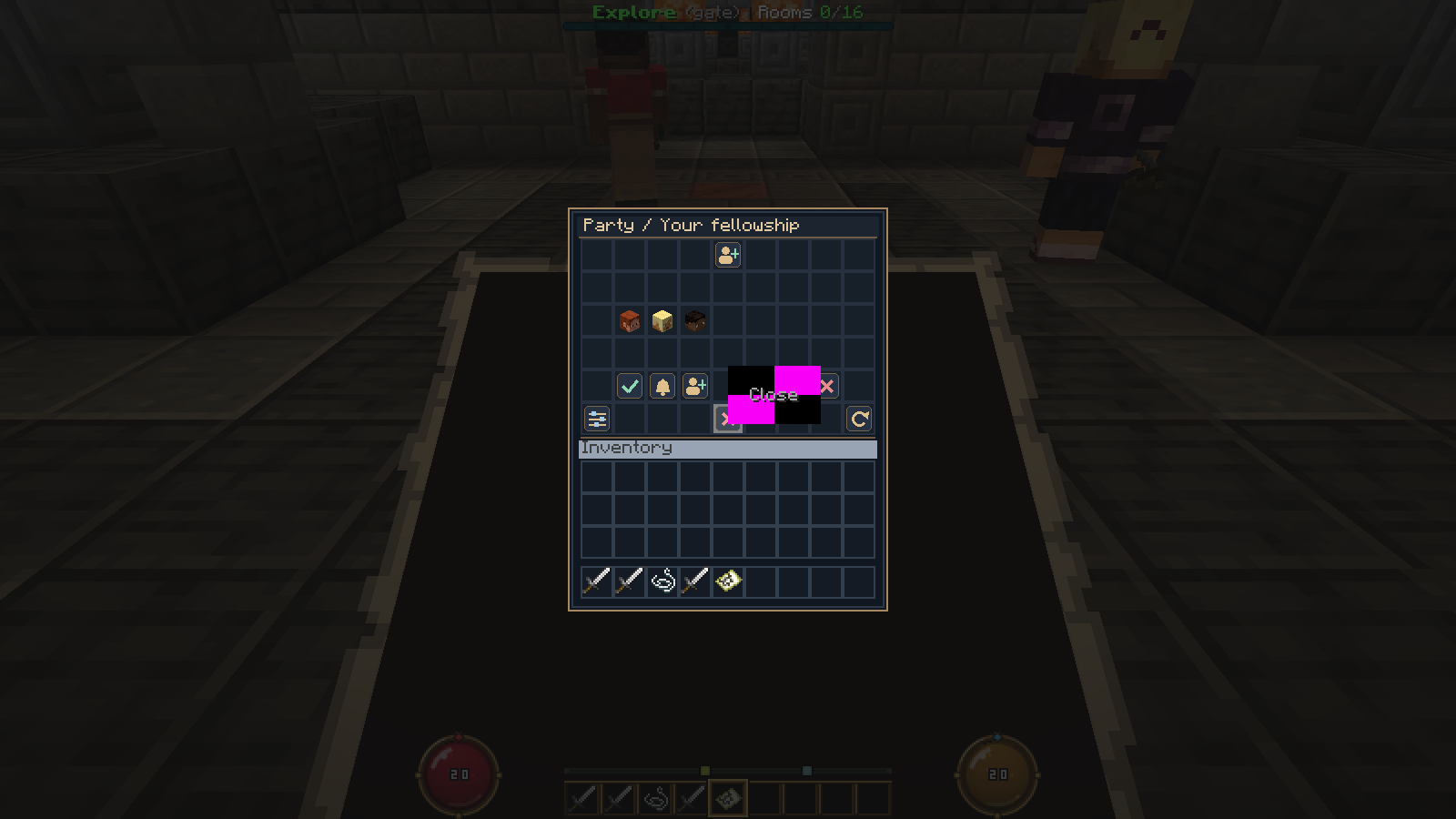
Without the companion, players can still use DungeonForge; ForgeHUD provides a concise action-bar dungeon summary. The large tracker card requires the companion. Classes, skill bars and talent trees require their own class plugins. A player without a class no longer sees an empty class skill strip.
Validation and photo notes
The 1.4.1 update adds 7 live self-panel checks and 8 actual in-game layout-control checks. They cover real health/max-health, HUD off/on, unknown/malformed handshakes, switching to classic orbs, lease expiry, independent saved scales, 50%/150% limits, detailed mode, anchors and reset with retained bindings. Geometry checks cover four anchors, small screens, invalid values and drag-coordinate round trips. Physical mouse dragging and every class-provider combination remain separate qualification items.
The integration passed 18 live server checks, a separate no-pack/no-companion fallback check, the HUD Java rule checks and a production companion build. Tests cover shared party authority, leader-only entry, two independent runs, timers, native boss phases, server/personal toggles, leaving and reconnecting with a fresh invitation. The 1.7.2 DungeonForge candidate also passed 157 unit tests.
Photos are native Minecraft screenshots from a local demonstration with offline test players. The encounter was staged, including temporary resistance and frozen mobs for photo composition. They are not testimonials or an unedited full gameplay run. The example dungeon was assembled for demonstration; the HUD download does not include a finished adventure or DungeonForge.
Public hosting, every mod combination, a complete adventure clear, long-session balance and load testing remain separate checks. Screenshots are from the development capture client; the delivered production companion has the same HUD features and no capture hooks.